
On November 10, OpenAI opened its books. Businesses in ChatGPT went live in beta, and with it came the Business Hub, the first place a business can see first-party numbers from ChatGPT itself: how often ChatGPT mentions it, how often people open its profile, and how often they click through to its website. For years that question was a guess. You could test prompts by hand, watch GA4 referrals from ChatGPT, or pay a visibility tool to sample a fixed list of questions. None of those showed what real customers actually asked, or what ChatGPT actually said back. Now OpenAI shows you three numbers, and the first ones are humbling.
Cogny claimed its business the day the Hub opened and shared the dashboard. In seven days ChatGPT mentioned cogny.com 108 times. Website clicks: zero. Another business, BuildUp Bookings, shared 690 mentions and 24 clicks over 28 days. That is a click rate of about 3.5 percent. OpenAI's own example dashboard shows a fictional toy shop with 15,356 mentions and 5,432 clicks, about 35 percent, but that shop does not exist. The real numbers so far say something simpler. Being mentioned is not being visited. A mention means ChatGPT said your name. A click means a customer left ChatGPT to come to you. The Hub counts both, and the gap between them is the story.
Last week I wrote that there was no public tool for this. There is now. ChatGPT handles about a fifth of Google's search-like query volume by OpenAI's own estimate, and until this week none of that volume was measurable from the business side. The Hub changes that, but only for ChatGPT, and only if you read the numbers the way they are meant to be read.
What Opened on November 10
Businesses in ChatGPT has two parts. The Business Hub is the management portal, where a business claims its profile in ChatGPT, keeps its information current, and sees how it shows up. Business Agents are the second part, a way for customers to start a conversation with a business inside ChatGPT, and those start with eligible ecommerce and online service businesses in the US, after a review by OpenAI. The whole thing is free in beta, and OpenAI puts the audience at 1.2 billion people using ChatGPT each week.
Claiming works three ways. OpenAI verifies a business by text or phone call to its main business number, or through DNS verification. Barry Schwartz claimed his own business by DNS and had an empty dashboard within hours. The claim itself is quick. What you get after it is the interesting part.
The dashboard has two tabs, Brand insights and Agent insights, with seven-day and 28-day views. Brand insights shows tiles for mentions, profile views, and website clicks, a mentions trend chart, and a panel of the top five discovery topics, the common themes across conversations where your website is cited. OpenAI describes the reporting as aggregated insights into how people engage with a business in ChatGPT, and it says the numbers appear only once there are enough conversations to cross its privacy thresholds. It does not share user conversations or Business Agent chats with businesses. For a local business, a mention is counted when ChatGPT shows a result for that location. For an online business, it is counted when ChatGPT references the website. Just naming the brand does not count. The profile views tile did not appear on every live dashboard shared on launch day, so treat its availability as uneven while the Hub is in beta.
Three limits matter before you celebrate. The views only go back 7 and 28 days, so the Hub keeps no history of its own. The counts carry about a one-day lag, and the launch-day dashboards were labeled data through November 9, a day before the launch, which means the counts cover activity from before the business claimed, not only after verification. And the clicks tile carries a tooltip that says the quiet part out loud: number of recorded clicks on links to your website in ChatGPT. Clicks do not confirm website visits or conversions. A Hub click is not a GA4 session, and the two will never match one for one.
Mentions Are Cheap. Clicks Are Rare.
Here is the funnel the Hub makes visible for the first time. ChatGPT mentions a business, a person sometimes opens its profile, and a smaller number clicks through to the website. Every step down loses most of the people above it, and the loss is the point. The funnel is thin because ChatGPT answers the question. When the answer already solved the problem, the customer has no reason to click anywhere.
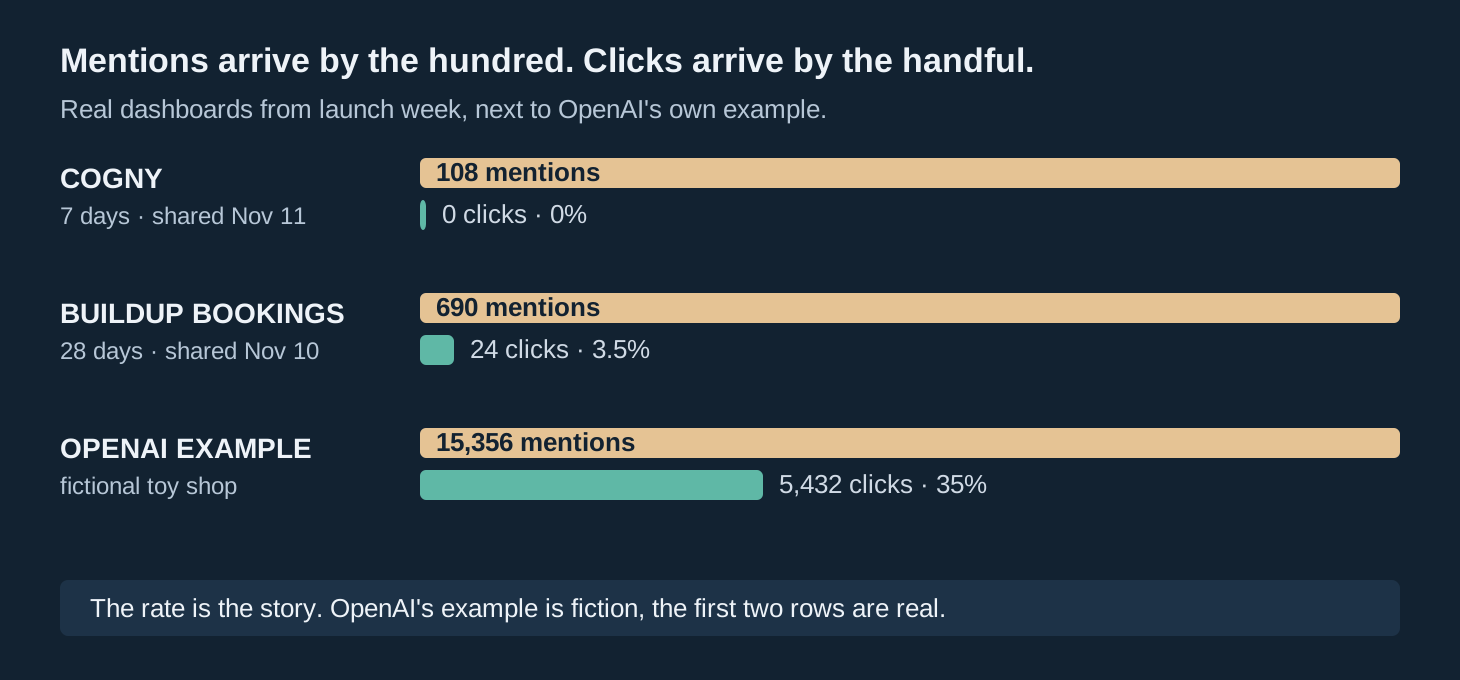
The numbers behind that funnel are small, and small is honest. Cogny had 108 mentions and 0 clicks in seven days, down 7.69 percent on the previous seven days. BuildUp Bookings had 690 mentions and 24 clicks in 28 days. A third dashboard, for a Spanish-language business called Zianvo, showed 28 mentions and one click. Two or three dashboards are anecdotes, not a benchmark, and the businesses that shared them are small. But the shape is consistent. Mentions arrive in the dozens and hundreds. Clicks arrive in single digits, or not at all.
OpenAI's example breaks the pattern, and that is why it needs a label. The fictional toy shop in the launch materials shows 15,356 mentions, 1,234 profile views, and 5,432 website clicks over seven days. That is a click rate near 35 percent, ten times the real 3.5 percent. The example was never presented as typical, but examples have a way of becoming expectations. If your first dashboard shows a few hundred mentions and a handful of clicks, you are not failing. You are seeing what the funnel actually looks like when the assistant answers the question itself.
That gap is the job now. I wrote earlier this year that winning a citation is not the same as winning the customer, and the Hub is the first-party proof of that argument. A citation puts your name in the answer. A click means the answer left something unsolved that only your site can finish. The businesses that get clicks will be the ones whose pages answer the next question, not the one ChatGPT already answered.

So the number to watch is not mentions. It is the mention to click rate: website clicks divided by mentions, over the same 28 days. A rate near zero means ChatGPT talks about you and nobody leaves. A rate climbing toward five percent means your pages are finishing jobs the answer starts. Mentions will rise and fall with how often people ask about your category. The rate tells you whether any of it turns into traffic.
What the Hub Shows, and What It Hides
A scoreboard is only useful if you know what it cannot see. The Hub shows three counts and five topics. It hides almost everything that would tell you why those counts are what they are.
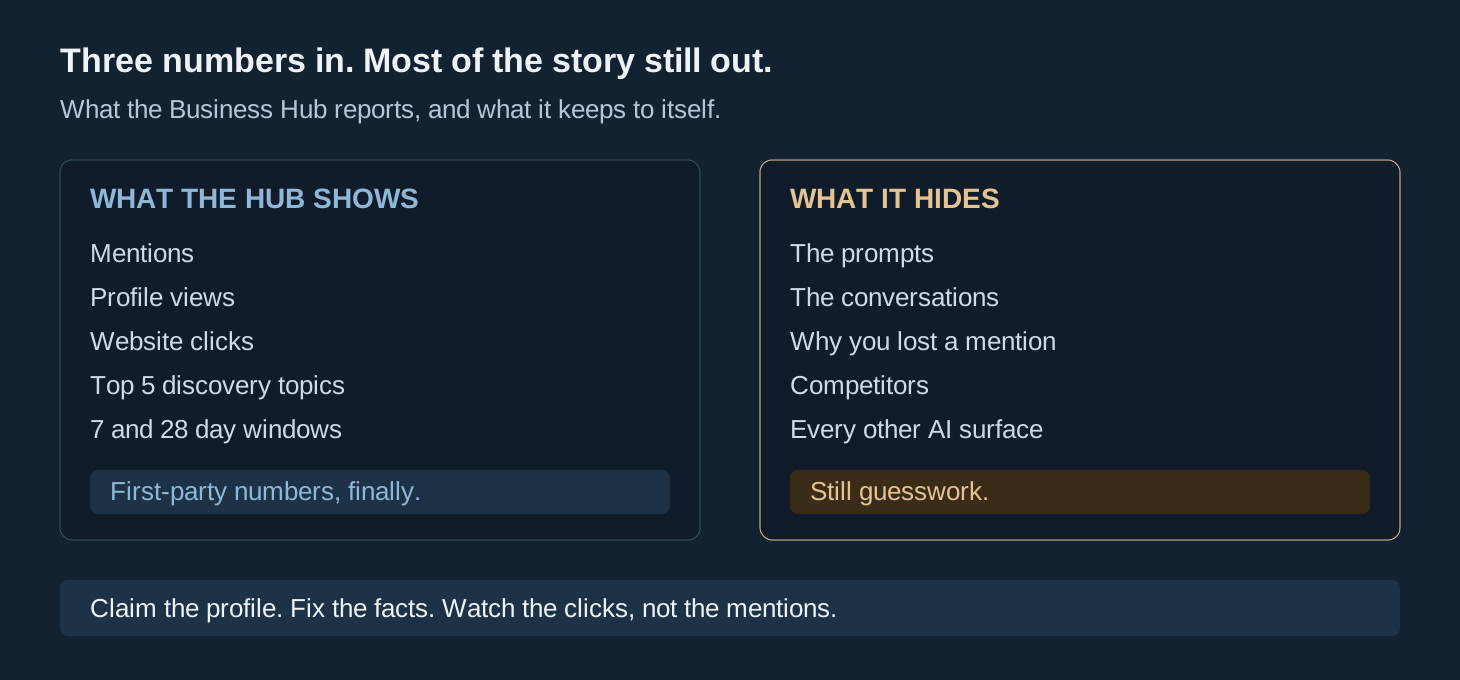
What you get is real, and it is more than anyone had last week. Mentions tell you whether ChatGPT knows you exist. Profile views tell you whether people open your listing after seeing your name. Website clicks tell you whether any of it becomes a visit. Discovery topics tell you which themes bring you into the conversation, and those themes are the closest thing to keyword data the Hub offers. If your top topic is a service you stopped selling, that is a fact worth fixing.
What you do not get is the rest. You cannot see the prompts, the conversations, or the answers where you were mentioned. You cannot see which mentions recommended you and which merely listed you. You cannot see why a competitor got the recommendation and you got the footnote. You cannot see any other surface: not Perplexity, not Gemini, not Claude, not Copilot, not Grok, not Google AI Overviews or AI Mode. The Hub covers ChatGPT only, and ChatGPT is one surface among many now.
That is the honest shape of it. The Hub ends the guessing about whether ChatGPT mentions you. It does not end the guessing about why, or about what the other assistants say. Treat it as one scoreboard, not the whole game.
Claim It, But Claim It Right
Claiming is free, quick, and worth doing. It is also worth doing carefully, because the account that claims a profile owns it, and OpenAI has published no process for moving a claimed profile to another account. Claim with the account that should own the listing for the long term, not whichever login is closest at hand.
I have not claimed my own agency listing yet, for exactly this reason. The listing would sit under my personal account, and there is no published way to hand it to a business account later. I would rather wait for an answer on transfers than claim it twice and sort out the mess after. If you run a business with a shared login or a marketing agency managing your profiles, settle the ownership question before anyone clicks claim. The verification takes minutes. Unwinding the wrong owner could take far longer, if it is possible at all.
Before you claim, fix the facts ChatGPT will show. ChatGPT describes your business from what it has read, and the Hub lets you correct it, but correction only helps if the underlying facts agree with each other. Keep your name, address, phone, hours, and categories identical on your website, your Google Business Profile, and your directories. If they disagree, fix the disagreement before adding new pages or new listings. That is the same discipline the local trust layer runs on, and the Hub makes it visible: a stale phone number or old hours in ChatGPT's answer is now a number you can see, not a suspicion you carry.

If your business is outside the US, one more note. The Hub is open where ChatGPT is available, but some claims outside the US went to a waitlist on launch day. Business Agents are US only for now. Claim and see what you get, but do not plan a launch around the agent feature until it reaches your market.
The Number to Watch Each Week
The Hub keeps 28 days of history and no more. That makes the routine simple, and it makes skipping a week costly. Write the numbers down yourself, every week, or they are gone.
First, record the three tiles on the same day each week: mentions, profile views, website clicks, over 28 days. Second, divide clicks by mentions and write down the rate. Third, read the top five discovery topics and note any theme that does not match what you sell. Fourth, fix one fact. A wrong service in the topics, an old price on your site, a stale description in the Hub, one fix a week is enough. Then check the rate again next week.
That routine follows the oldest local rule there is: track actions, not impressions. Mentions are impressions. Clicks are actions. A mention count that doubles while clicks stay at zero is not growth. It is ChatGPT talking about you more while nobody visits. The businesses that learn this in the first month will be the ones whose pages finish the job the answer starts, while everyone else celebrates a mention count that never becomes traffic.
Share of model is the same trap in a different costume. A count of how often the model says your name feels like progress, and it can be, but only if the next number moves with it. The Hub gives you both numbers side by side for the first time. Use them that way.
What to Watch Next
Three things will decide how far this goes, and all three are already moving.
Business Agents are the first. The chat feature starts with eligible ecommerce and online service businesses in the US, after an OpenAI review. If it works, the Hub stops being a scoreboard and becomes a storefront, and the businesses that claimed early will already have their facts straight when the agent starts answering from them. Watch for the rollout to widen past the first categories.
Google's November core update is the second, and it started the same day the Hub launched. The rollout runs about two weeks, ending just before Thanksgiving and Black Friday. Do not judge any Google ranking, traffic, or Search Console change until it finishes. A drop during the rollout is not a diagnosis. The Hub is a second scoreboard, and it is not Google, so its numbers stay readable while Google's are mid-rollout noise.
The third is everything the Hub does not cover. Perplexity, Gemini, Claude, Copilot, Grok, and Google's own AI Mode and AI Overviews all answer the same customers, and none of them has a Business Hub. The first business in a category to be cited across all of them wins more than the first business to claim one profile. That work is still manual: test the prompts yourself, watch the referrals, and keep the facts straight everywhere, not just where a dashboard exists.
The scoreboard is open. The businesses that learn to read it first will get the clicks while everyone else counts mentions.