
On Friday, November 6, local SEO watchers started seeing something odd on Google Business Profiles. A Book Online button had appeared on listings that never set it up. Search Engine Roundtable reported it on November 9: Google may be automatically adding booking links to some local business profile listings, and in some cases the link breaks and lands on a 500 error page on Google's own site. Google Business Profile booking just changed from a setting you choose into a button Google adds for you.
That is the smaller half of the story. Five days earlier, Google Search product VP Robby Stein announced on X that AI Mode in the US now books home services directly through Angi, Thumbtack, Housecall Pro, and Jobber, with ServiceTitan coming soon. The booking button sits inside the AI answer now, next to the recommendation.
Put the two together and the shift is plain. The customer used to find you on Google, click through to your site, and book there. Now the booking happens on Google's surface, on a button you may not have placed, pointing where you may not have chosen. Your profile used to earn the click. Now it has to close the booking.
What Google Business Profile Booking Means Now
Start with what actually happened, because the report is careful and the details matter. Barry Schwartz noticed a booking link on his own company's profile, then heard from Brandon Schmidt, Joy Hawkins, and Syed Amir that more businesses were seeing the same thing on Friday. Home care and home services profiles showed Book Online buttons without any booking software installed or configured. One of Joy Hawkins' buttons served a 500 error when she clicked it. Schwartz tried his own later and landed on the company's contact and scheduling page, so the breakage may have been temporary. The pattern is real either way. Buttons are appearing on profiles that never asked for them.
The trigger looks simple, and that is what makes it easy to miss. Syed Amir found that adding a website Contact page in the Booking Link section of a profile now produces a Book Online button. Before this, that button seemed to require a setup through one of Google's approved booking partners, under Reserve with Google. Now a plain contact page can do it. Google's own help pages already say links to appointments or reservations can appear automatically through third-party partners. What changed is the bar. A business with no partner, no scheduler, and no booking software can wake up with a booking button anyway.
Check your own profile before you decide this does not apply to you. The report does not say which categories or countries are affected, and Google has not announced anything. The businesses spotted so far are home care and home services, but the mechanism is a profile field, not a category feature. Any verified profile with a link in the Booking Link section could be next, and a profile with a third-party booking integration could already have a provider link it never placed.
One more detail from the report is worth holding onto. When the link points at Google's own Reserve booking page instead of the business's own page, it can return the 500 error. When the business has its own link or software set up, it works. That split tells you where the risk sits. Google is guessing at a destination when you have not given it one. A guess that lands on a dead page costs you the customer at the exact moment they tried to book.
The Booking Moved Into the Answer
The profile change landed five days after the bigger one. On November 4, Stein announced that AI Mode now includes direct links to research and book home services, live in the US. A searcher asks AI Mode for a handyman to build a bed and dresser tomorrow. The answer lists local providers with ratings, short descriptions, and available times, and the booking or quote button sits right there in the answer. No click to a website first. No phone call to check availability. The answer is the storefront.
The way in runs through four partners. Angi and Thumbtack are the marketplaces. Housecall Pro and Jobber are the field service platforms. ServiceTitan is named as coming soon. Each partner has its own rules, and the rules are not the same. Jobber says eligible US customers can be found and booked through AI Mode now, with no lead fees, but only with a paid subscription, a full address, a Google Business Profile connected to Jobber at the same location, and a request or booking form assigned to Google. Housecall Pro says its professionals are auto-enrolled at no additional charge, and the integration is coming soon to eligible US customers. Angi sends the homeowner to the pro's Angi profile to request a quote. Thumbtack had not announced its own AI Mode plan as of November 4.
Read the fine print on fees before you celebrate the no-lead-fee lines. Jobber and Housecall Pro both say no lead fees on bookings that come through AI Mode. That contrasts with Google's own Local Services Ads, where a booking request counts as a lead the advertiser pays for in the US and Canada. Angi's announcement does not say whether its fees apply to quote requests that start in AI Mode. The booking is free to receive on two platforms and unclear on the third. Do not assume the whole route is free.
The hard limit is the one Stein did not spell out. A business on none of the four partners has no route to a booking button inside AI Mode at all. Your profile can rank, your reviews can shine, and the answer can still show your competitor with a button and you without one. I covered the Local Services Ads move into Google Ads earlier this year, and the pattern rhymes. Google keeps moving the transaction onto its own surface, and the toll is membership in the system that runs it.
Your Profile Is the Checkout Now
Here is the part the coverage has not said out loud. For years, the Google Business Profile was a ranking asset. You kept the hours right, the categories tight, the photos fresh, and the reviews answered, because that earned you a spot in the map pack and the click that followed. The profile was the sign outside the shop. The sale happened somewhere else.
That model held while the click was the whole trip. It does not hold now. The booking button turns the profile into the place the customer acts, and Google is the one placing the button. The sign outside the shop now has a till attached to it, and the shopkeeper did not install it.
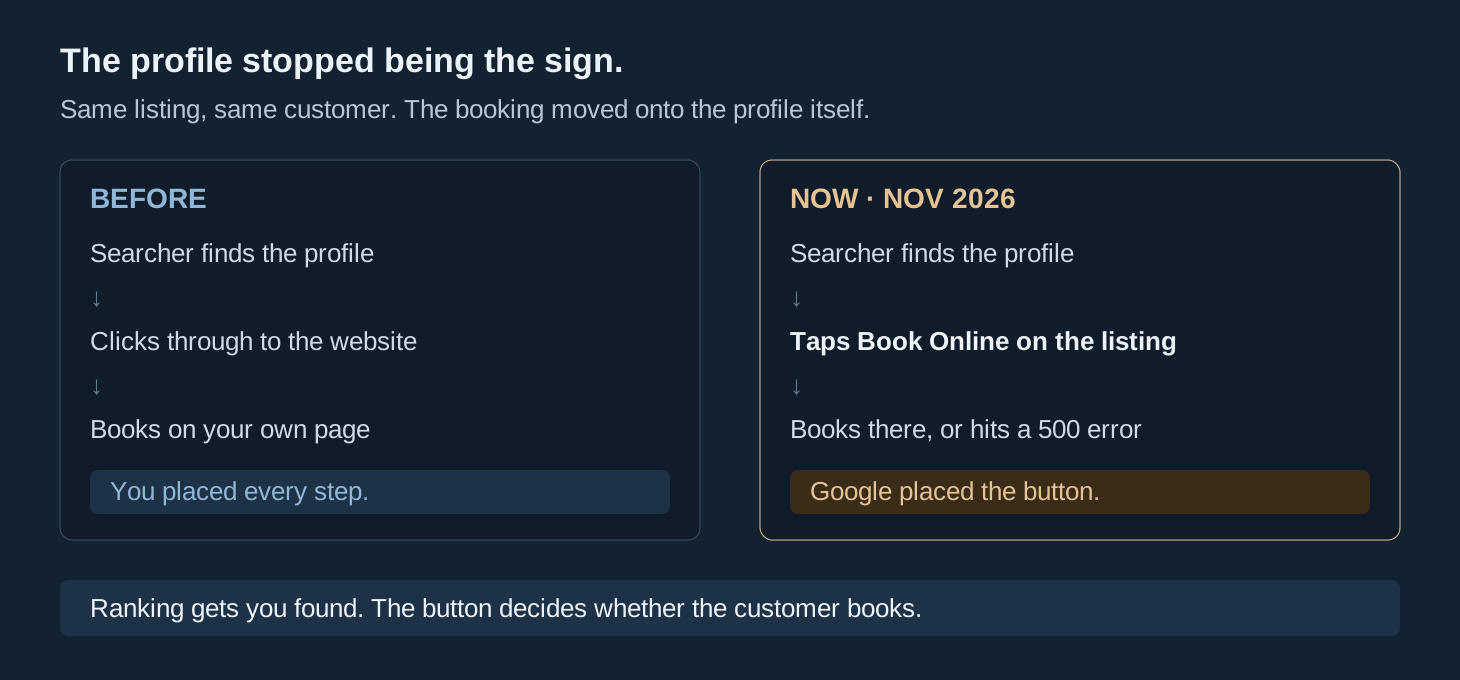
That changes what good profile work looks like. Ranking work still matters, but it is no longer the whole job. A profile that ranks first and books into a 500 error loses to a profile that ranks third and books cleanly. The customer does not see your position. They see a button that works or a page that fails. The trust layer I wrote about in September was already pointing this way: mentions, profile actions, calls, and bookings have to be tracked together, because a rank alone no longer describes what the customer does. This week made that concrete. The action is now the product.
It also changes who owns the risk. When you placed the booking link yourself, a broken link was your bug. When Google places it, the broken link is still your lost booking. The customer does not know or care who added the button. They tried to book, it failed, and they moved to the next name on the list. Nobody at Google calls you about it. The only fix is to look.
There is a second shift hiding inside the first. The button rewards businesses whose facts are already in order. AI Mode picks providers using profile data, review content and recency, and pricing signals. A profile with stale hours, a category that almost matches, photos from 2021, and reviews nobody answers does not get the booking button. It gets skipped. The profile work you have been putting off was always about trust. Now it is also about whether the button shows up at all.
The Audit, This Week
None of this needs a new tool or a consultant. It needs an hour and a list of every profile you own or manage. Do it this week, before the next customer finds the button first.

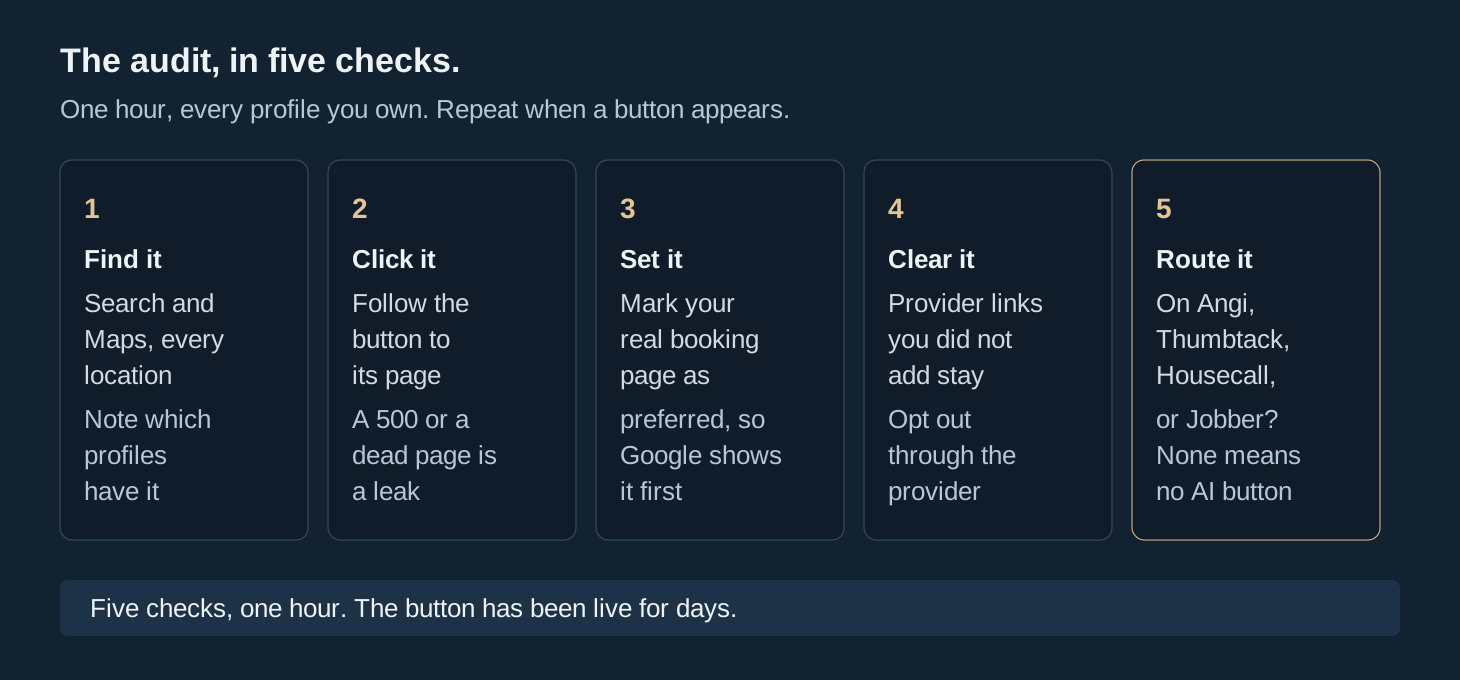
First, find the button. Search your business name on Google and open the profile on Maps too. Look for Book Online or Schedule on every location, not just the main one. The rollout is uneven, so a button can be live on one location and missing on the next. Note which profiles have it and which do not.
Second, click it. Follow the button to wherever it lands and watch what happens. A working booking or contact page is fine. A 500 error, a dead page, or a generic homepage is not. Google's own link rules say the page has to let the customer finish the action the button promises. A contact form the business reads on Monday is not a booking page, and a homepage is not a destination. If the click fails, you just found a leak that was already costing you bookings.
Third, set your preferred link. In the profile's Booking section you can add up to ten links per category and mark one as preferred. Point it at the real booking page, the one that knows your availability and takes the appointment. If you only have a contact page, put the contact page there and fix the page so it can actually take a booking request the same day. The preferred link is the one Google shows first, so make it the page you would choose if a customer asked you where to book.
Fourth, look for provider links you did not add. A third-party booking provider can appear on your profile automatically, and Google's help pages say you cannot delete those from your profile settings. You opt out through the provider, and the provider has five days to remove the link once asked. If a marketplace or scheduler you stopped using still sits on your profile, it is still taking the click. Find it, contact the provider, and get it off.
Fifth, confirm your route to the AI Mode button. If you run home services, check whether you are on Angi, Thumbtack, Housecall Pro, or Jobber, and whether your setup meets that partner's rules. Jobber needs the paid subscription, the matching address, and the connected profile. Housecall Pro auto-enrolls its users when the integration lands. If you are on none of them, you have no route to the button, and that is a decision to make with open eyes, not a surprise to find later. ServiceTitan users should watch for the launch date and turn the connection on the day it goes live.
Keep a note of what you found on each profile. The rollout is still moving, and a profile that is clean today can gain a button next week. Add the booking check to the same routine as hours and reviews. It takes five minutes once you know where to look.
What to Watch Next
Three things will decide how far this goes, and all three are already moving.
ServiceTitan is the first. It is the platform that runs dispatch for HVAC, plumbing, and electrical shops, not just booking. When its integration lands, the route from AI Mode answer to a booked job with a truck assigned gets shorter, and the shops on it gain a button the shops off it do not have. If you run on ServiceTitan, the launch date is a calendar item, not a news item.
The second is the claim-your-listing wave on the other surfaces. OpenAI is building a Business Hub where a company claims its business in ChatGPT and sees mentions and clicks, spotted November 6 and still unannounced. Apple is syncing merchant hours, menus, and booking links into Apple Maps and Siri through Square, and Siri AI in iOS 27.3 will draw on Apple Business listings. Google is not the only surface adding a button you did not place. Every assistant that answers for your business will need the same facts, and the same audit.
The third is messaging. Google expanded business messaging into the Maps app in November and is piloting an AI messaging agent that answers from verified profile data. The profile is becoming the place customers talk to the business, not just find it. An unanswered message and a wrong service list will cost conversations inside Maps itself, the same way a broken booking link costs bookings.
The pattern across all three is the same, and it is the point of this post. The listing stopped being a pointer to your business. It is becoming the business, at least for the first transaction. Rank still helps. It is no longer the job. The job is owning every button on the page with your name on it, including the ones you did not put there.
Go look at your profile and click the button, then decide what it should say.