
Black Friday is November 27, and parts of your ads for it may not be yours.
Between September and October, Google switched on four Google Ads features by default, according to a Digital Autopilot update from October 27, 2026. Meta changed its commercial terms on October 30 so advertisers carry sole responsibility for AI edits to ads, as Seafoam summarized from Adweek's October 22 report. None of these changes asked you to approve a new ad. They changed what your existing ads can say, show, and promise.
Coverage reported this as a list of features. The real shift is who approves what. Your campaign settings used to be the record of your decisions. Now they are a starting point that platforms can move, while the bill and the blame still land with you.
The Approval Gap
The approval gap is the distance between the ad you signed off and the ad that is actually running. It opens whenever a platform changes an offer, a headline, or a creative after launch, without a fresh yes from you.
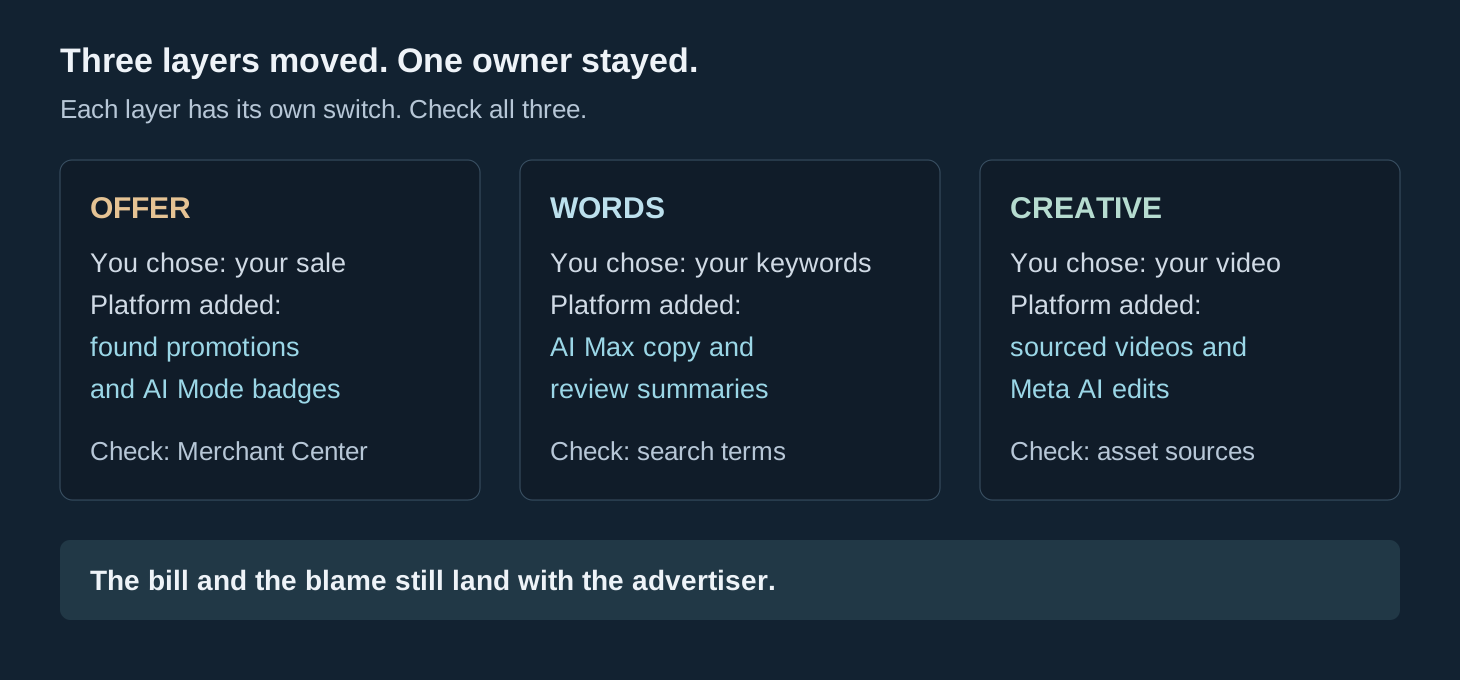
Three layers moved in October: the offer, the words, and the creative. Each has its own switch, its own check, and its own way of going wrong. Treating them as one vague "AI change" is how a bad offer stays live for a whole sale weekend. Check all three, separately, before you spend Black Friday money on top of them.
Your Offer Moved First
Start with the offer, because an offer is a promise, and a wrong promise costs more than a weak headline.
On October 12, Google began rolling out automated promotions. Google Ads scans your website for coupons and deals and turns them into promotion assets for eligible Search and Performance Max campaigns, according to Digital Autopilot. It applies to campaigns with linked location assets that do not already have a promotion you created yourself. If you wrote your own promotion asset, Google leaves that campaign alone. If you did not, Google can fill the gap with whatever it found on your site.
Google says automated promotions run for less than 24 hours at a time and can appear again while it keeps detecting the offer, and it cannot yet extract promotion start and end dates. An old sale page that is still live, a first-visit offer with conditions buried in fine print, or a deal that only runs at one location can all become ad copy. The platform found the words on your site. You still own what the shopper was promised.
The same date brought a second offer change, this one inside AI Mode. On October 12, Google started showing Merchant Center promotion badges inside Shopping ads in AI Mode, according to Common Thread Collective. Brands with approved Merchant Center promotions get the badge automatically. Brands without them do not appear in that format at all. No new campaign is needed, and no new campaign can substitute for a missing promotion.
That turns Merchant Center into a Black Friday deadline. Common Thread Collective recommends submitting every Black Friday promotion by about November 20, and calls November 25 the latest date, based on Google's typical 24 to 72 hour review window. November 25 leaves no room for a disapproval. A promotion must work at checkout exactly as described, because Google tests it against a real cart, and its title must name a specific offer.
I wrote recently about how the auction moved inside the AI answer. The contest is now who has a clean, approved offer in the system when the answer is built.
The shopper sees the badge before she sees your store. If the badge promises something your checkout cannot honor, the argument starts after the click, and you lose it.

Your Words Moved Second
The words moved in two places, both harder to spot than a wrong price.
The first is AI Max for Search. Through September, Google automatically upgraded two groups of existing Search campaigns: campaigns using automatically created assets got search term matching and text customization, and campaigns using campaign-level broad match got search term matching, according to Digital Autopilot. Search term matching lets Google show your ads for searches beyond your chosen keywords, using your website and existing ads. Text customization lets Google generate headlines and descriptions for individual searches.
That can find searches your keyword list missed. It can also spend a small daily budget on people looking for jobs, DIY advice, or a competitor's product. On a $50 daily budget, a few wrong clicks change the week. Open the search terms report for AI Max campaigns, set the date range from September 1 onward, and look for searches you would never have targeted. Add negative keywords for the clear mismatches, and check which landing pages final URL expansion sends traffic to. Careers pages and expired offers should not be paid landing pages.
One pinning trap matters here. Google says pinned assets are not respected when final URL expansion or URL inclusions are enabled. If a pinned headline carries a disclaimer you need, turn those two settings off.
The second words change has no off switch at all. Google published a help page on October 24 for AI-generated review summaries in Search ads, covering eligible English-language ads in Australia, the United States, the United Kingdom, and India. Google writes a short description of your business from reviews across the web. The summaries are positive-only, according to Google, and appear when its systems predict they will improve ad performance. You cannot edit them, and Google has not published a way to disable them.
For most businesses, that leaves one move. Read what Google is drawing from, and contact support if something inaccurate appears. For regulated health practices, the stakes are sharper, because a summary could state a clinical claim that local advertising rules forbid. Digital Autopilot flags that risk for dentists, podiatrists, and optometrists, and advises raising it with support and seeking professional advice. The platform wrote the words. You still answer for them.
Your Creative Moved Third
The creative layer is where old content comes back to life.
In late October, Google's documentation said sourced videos are enabled by default for new Performance Max campaigns and may have been activated for some existing ones, according to Digital Autopilot. Google can add up to 10 sourced videos per asset group, drawing from approved sources such as your social accounts, landing pages, and linked YouTube channel. The videos go to a Google-owned YouTube channel branded with your business name, and Google can change which videos it uses over time.
Think about what lives in those sources. An old promotion with prices that changed, a video featuring a staff member who left, or something you posted years ago that no longer shows the business well. Any of it can now run as paid creative. The check sits in the campaign's asset group settings, under asset optimization, where you can manage sources and see videos Google already added.
Meta moved the same week, from the other direction. Its revised terms took effect October 30 and make advertisers solely responsible for AI edits to ads, according to Seafoam. Features can be turned off in Ads Manager, but the terms did not directly say whether advertisers are liable for features they never enabled. Ask your lawyer about that gap, and ask whoever runs your account who approves an AI-made change before it goes live.
Two days before those terms, on October 28, Meta said it will add product browsing to existing ads, so a person who taps an ad may see product details inside Facebook or Instagram before reaching your website. Meta's own notice claims businesses saw 3 percent more conversions on average with in-app product browsing. That is Meta's number, not an independent one. A shopper who never reaches your site still forms an impression of your price and range from inside the app.
Read Meta's October 6 assistant test next to the October 30 terms. At Advertising Week in New York, Meta tested an assistant that creates the campaign, changes the targeting, and moves the budget from a chat prompt. Meta claims advertisers who adopt its recommendations typically see 5 percent more conversions at the same cost per conversion. That is Meta's claim, and the feature is still in testing. The tool is gaining the ability to act, and the advertiser answers for what it did.
The ad you approved was a snapshot. The ad running now is a moving target, and the movement is logged in settings pages, not in your inbox.

The 30-Minute Audit
You do not need a new strategy for Black Friday. You need a dated record of what is actually running, so sale-week results can be read honestly.
Set a timer, work through the three layers in order, and write down what you find with today's date. Avoid major structural campaign changes in the two weeks before the sale, which puts the change freeze around November 13. An audit is not a structural change. It tells you whether one is needed before the freeze.
First, the offer. In Google Ads, open Assets, filter by promotion, and look at the Added by column. Anything marked Google AI was created by Google, not by you. Check whether each offer is valid, correctly worded, and honored at checkout. Remove expired offers from your website, because a live old page is a live old promise. For planned sales, create your own promotion assets with correct dates. In Merchant Center, confirm every Black Friday promotion is approved, with November 20 as the sane deadline and November 25 as the last resort.
Second, the words. Filter campaigns for AI Max on, then read the search terms report from September 1 onward. Exclude clear mismatches, check final URL expansion landing pages, and review generated headlines for claims you would not approve. Note any review summary on your own ads. You cannot switch it off, but you can know it exists before a customer quotes it back to you.
Third, the creative. In each Performance Max campaign, open the asset group, check asset optimization, and manage sourced video sources. Switch the feature off where the sources contain old or off-brand material. In Meta Ads Manager, record which AI and product browsing settings are on, and ask who approved each one. If nobody can answer, that is the finding.
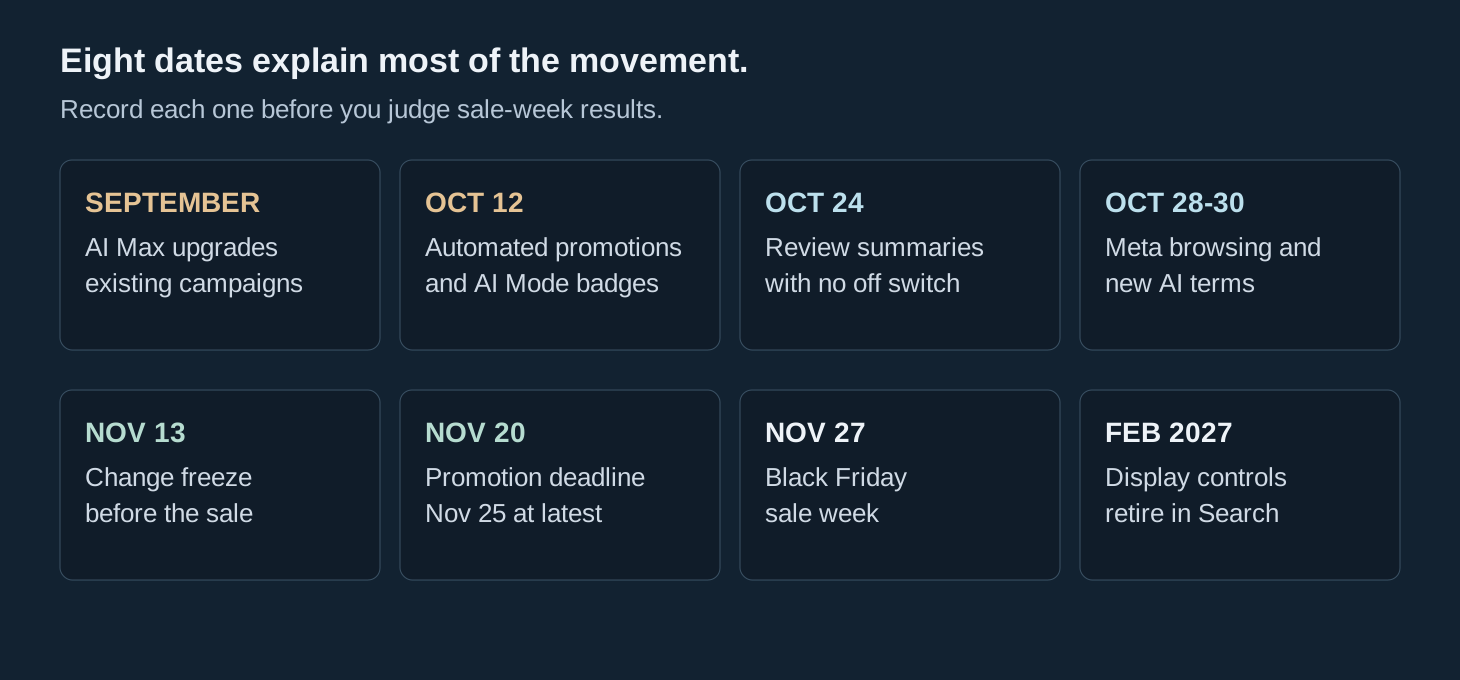
One more date belongs on that record. On October 14, Google announced Channel Prioritization and Budget Allocation, rolling out across Search, Shopping, Performance Max, and Demand Gen. According to Common Thread Collective's write-up, as summarized by Seafoam, every channel defaults to High priority, and Google will retire the existing Display Network spend controls in Search campaigns in February 2027. The same source suggests setting Display to Low priority with a 50 percent allocation before then. Treat that as one agency's suggestion, not a rule. Pull your own Display conversions and revenue for the last 12 months and decide from that.
After Black Friday
When sale week ends, resist the first story the dashboard tells you.
If results jumped, ask how much came from a promotion you wrote, a headline you approved, or a video you chose, and how much came from a default that switched on in October. If results fell, ask the same question in reverse. A report that cannot separate your decisions from platform defaults cannot tell you what to repeat next year.
That is why the audit matters more than any single setting in it. A dated snapshot of offers, words, and creative turns a confusing sale week into evidence. Without it, December arguments about performance will have no record of what actually ran in November.
Write the snapshot down this week and keep it next to the sale-week report. Then, when someone asks what worked, you will have an answer that names a decision you made, not a default you missed.